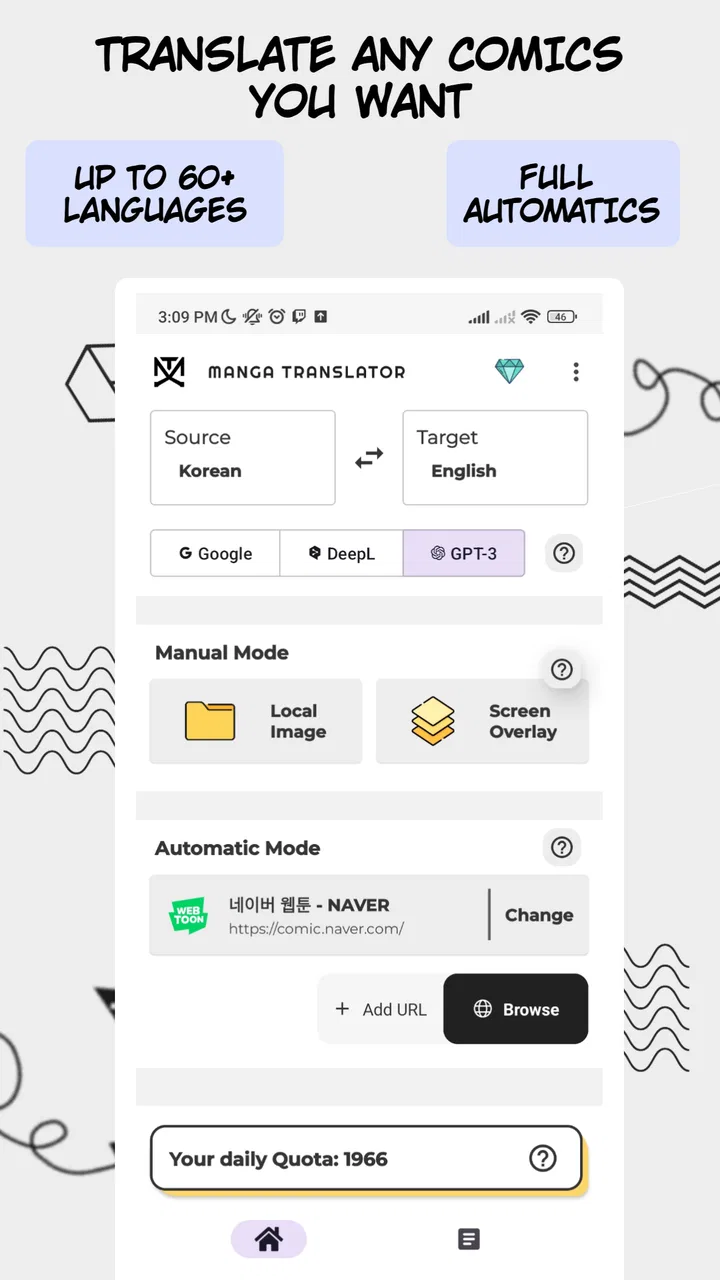
Manga Translator - Translate
- 3.1
- Rating
- 100.00K
- Installs
- Free
- Price

 Analysis by App-foxy
I tried Manga Translator - Translate as a practical comics-reading tool rather than treating it like a normal manga library. Its appeal is straightforward: it is designed to help translate and read manga, manhwa, manhua, and other comics, especially when the original text is difficult to understand. That makes it interesting for readers who already have pages or panels they want to work through, but it also means the experience depends heavily on how clearly the artwork presents its text.
This is a free Android app in the Comics category, developed by Wiryaimd. It is available for Everyone, supports devices running Android 8.1 or later, and its current version is 3.0.1. The app has passed the early trial stage for many users, with over one hundred thousand installs, although its average rating sits at 3.1 from around one and a half thousand ratings. I read that combination as a useful warning: the idea is attractive, but the results may not be equally smooth for every comic or every reader.
My main takeaway is that this is a translation aid, not a replacement for a polished comic reader or a professional translation. When I approach it with that expectation, it makes more sense. It can help me understand a speech bubble, check the meaning of a page, or follow a series that I cannot comfortably read in its original language. It is less convincing when I expect perfect lettering, flawless context, or the same consistency I would get from an officially localized edition.
You May Also Like

 Blood Strike: 2.5 Anniversary
Blood Strike’s Loadouts Turn Every Drop Into a Tactical Gamble
A close look at Blood Strike’s custom loadouts: how fast access to signature weapons reshapes its battle royale rhythm, rewards preparation, and narrows the gap between fights.

 Pandora - Music & Podcasts
Pandora’s Music Is Easy to Start, but Harder to Recover
Pandora’s strength is its low-effort path from a seed to a station. Its weak spot is how much confidence it asks you to place in connection, setup, and quiet recovery.

 8 Ball Pool
 Is Built on Rivalries, Rematches, and Routine
A close look at the rivalries, rematches, shared routines, and unanswered safety questions that turn a quick pool match into a persistent mobile community.

 Samsung Music
’s Quiet Strength Is Playing What You Already Own
Its reach comes less from spectacle than from dependable access to a personal library. That simplicity is both the app’s strongest retention engine and its ceiling.

 AccuWeather: Weather Radar
AccuWeather Review: A Quick, Clear Forecast for Everyday Decisions
For everyday plans, the best forecast is the one you can understand quickly. AccuWeather makes rain timing, radar, and local conditions easy to act on, with a few trade-offs.

 Hill Climb Racing
Why Hill Climb Racing Still Turns Crashes Into One More Run
A tiny car, a bumpy hill and one more upgrade: Hill Climb Racing keeps resurfacing because its simple chaos makes every near-miss feel personal.
More From Our News Desk



What the app is really useful for
The strongest use case is quick comprehension. If I come across a manga panel in Japanese, a manhwa page in Korean, or a manhua page in Chinese, a translation-focused app can remove the first barrier: figuring out what the dialogue is saying. That is valuable for language learners, curious readers, and people who have found a comic outside the languages they normally read.
I would not describe the experience as simply opening a catalog and choosing from a large built-in collection. The practical mindset is different. I think of the app as something to use with comic pages that need interpretation. That distinction matters because readers looking for recommendations, reading history, synchronized libraries, or a deep discovery system may be happier with a dedicated manga platform instead.
For a casual reader, the most useful moment may be a single difficult panel. Imagine reading a translated chapter elsewhere and finding an extra page, a bonus illustration, or a screenshot shared by another reader. Instead of abandoning it because the text is unfamiliar, I can use a translator to get the general meaning. That is a realistic everyday advantage, even if the result still needs a little judgment.
It can also be helpful when I am comparing translations. A machine-assisted result may reveal whether a line is probably a joke, an insult, a question, or a simple statement. It will not always preserve the exact tone, but it can give me a second perspective when an existing translation feels confusing. In that role, the app is more useful as a reading companion than as the sole authority on the text.
Why comic translation is harder than ordinary text
Comic pages are visually complicated. Dialogue can be curved, vertical, stylized, partly hidden by effects, or placed over a busy background. Sound effects may be mixed with speech, while handwritten notes and decorative lettering can look very different from ordinary printed text. A translation tool has to identify the relevant words before it can make a sensible attempt at rendering them in another language.
That is why I would judge a result panel by panel instead of expecting an entire chapter to behave uniformly. A clean speech bubble with dark lettering is a much easier target than a dramatic action page filled with speed lines. If one page works well and the next looks awkward, that does not necessarily mean the app is useless; it reflects the uneven material it is processing.
One practical habit improved my results: I would focus on readable panels rather than feeding the app a page packed with tiny bubbles and sound effects. If I only need one line, isolating that area is often more sensible than asking the tool to interpret every piece of text at once. This is a small workflow change, but it makes the app feel less unpredictable.
Controls, choices, and trust while using it
When I assess an app like this, I pay attention not only to whether the translation works, but also to how much control the reader has during the process. A translation tool may handle personal comic pages, screenshots, or material that a user would rather not treat casually. That makes visible choices important: I want to know what I am selecting, when I am sending or processing it, and whether I can stop before continuing.
The information available for this app identifies it as free to install, with optional in-app purchases ranging from $0.99 to $49.00 per item. I would therefore check the purchase screen carefully before confirming anything, especially if I plan to use the translator frequently. The free entry point is useful for testing, but readers should not assume that every possible use will remain equally unrestricted.
I also recommend spending a moment with the app’s own permission prompts and Android settings rather than accepting every request automatically. The important question is not whether a permission sounds normal in general, but whether it makes sense for the specific action I am trying to perform. If I am selecting an image, I want the choice to feel deliberate. If I am finished working with a page, I prefer to know what remains available to the app through the device controls.
That approach is especially sensible for readers handling private screenshots, personal notes, or unpublished artwork. I would avoid treating a translation utility as a private archive by default. Before using it with sensitive material, I would review the visible choices, avoid sharing anything unnecessary, and remove access through Android settings when I no longer need it. Those are simple habits, but they give me more agency than relying on assumptions.
Where the experience can become frustrating
The average rating of 3.1 suggests that expectations deserve careful management. I do not read that score as proof that the app fails, but I do take it as a sign that reliability and ease of use may vary. A translation app can feel excellent on a clear page and disappointing on a heavily edited one, so a single overall score cannot explain every experience.
The first likely source of friction is recognition. If text is too small, distorted, covered by artwork, or written in an unusual style, the app may misunderstand it. A wrong character can change the meaning of a whole sentence. Even when the words are recognized correctly, the translated sentence may sound stiff because comics rely on context, relationships, slang, and implied emotion.
The second issue is visual presentation. Translating the words is only half the job in a comic. The reader also needs to follow who is speaking and where the translated text belongs. If the app does not preserve the page’s visual rhythm perfectly, I may find myself switching between the original and the result to understand the scene. That is acceptable for checking meaning, but tiring for long reading sessions.
The third issue is speed and repetition. A person translating one or two panels has a very different experience from someone trying to process a full chapter. Repeatedly checking pages, correcting misunderstandings, and comparing the result with the artwork can interrupt the flow. I would use it in short sessions first, then decide whether the effort is reasonable for a longer project.
How I would use it in an everyday reading session
Suppose I receive a page from a friend who is reading a comic in a language I do not know. I would begin with the clearest panel, not the whole page. I would check the translated sentence against the character expressions and the surrounding panels. If the line seems strange, I would try again with a tighter crop or a cleaner image rather than immediately trusting the first result.
Next, I would separate dialogue from sound effects when possible. A large stylized sound effect can distract from the actual speech and may be interpreted as part of the sentence. Keeping the target narrow helps me decide whether the app is translating the words I care about. This is one of the more useful practical distinctions between using the app carefully and simply expecting an automatic button to solve everything.
For a longer chapter, I would keep the original page beside the translated result. That gives me a way to recover when a bubble is assigned to the wrong speaker or a sentence loses its context. I would also note recurring names and terms myself, because automatic translation may handle the same fictional word differently from one panel to another.
Finally, I would treat the output as a reading aid. If a line affects the plot, reveals a character’s identity, or depends on a pun, I would look for additional context instead of making a major interpretation from one machine-generated sentence. This is not a criticism unique to this app; it is the sensible way to use any automatic comic translator.
Who will appreciate it, and who should choose another tool
I think this app is most suitable for readers who already have a specific translation problem. That includes someone checking a few unfamiliar panels, a language learner comparing original wording with a rough English meaning, or a fan exploring comics that have not been officially localized in the reader’s preferred language. The low barrier of a free app makes experimentation easier.
It may also suit people who are comfortable adjusting their workflow. The best results require patience: choosing readable material, checking context, and accepting that some pages need another attempt. Readers who enjoy understanding how a tool behaves will probably get more from it than readers who want a completely invisible translation layer.
I would skip it if my priority is a polished, uninterrupted reading experience. An official localized edition will usually be better for natural dialogue, consistent names, cultural notes, and professional lettering. A standard manga reader will also be a better choice if I mainly want browsing, collections, chapter organization, and comfortable long-form reading rather than translation help.
I would also be cautious about using it as the only tool for study or professional translation. It can provide clues and save time, but comic language is full of nuance. A human translation, a dictionary, or a second translation source is preferable when exact wording matters. The app’s strength is access and convenience, not guaranteed literary precision.
How it compares with familiar alternatives
Compared with reading an officially translated comic, this app offers flexibility at the cost of polish. It can help with material that is not available in my language, but it may not preserve jokes, honorifics, speech patterns, or panel layout as naturally as a professional edition. The trade-off is worthwhile for exploration, not necessarily for every chapter of a favorite series.
Compared with a general camera or text translator, a comic-focused tool is conceptually better matched to panels and pages. The challenge is still the same: artwork, bubbles, and visual storytelling complicate recognition. A general translator may be convenient for a single sign or line, while this app makes more sense when the source is clearly a comic page.
Compared with a language dictionary, it is faster for getting the broad meaning of a complete bubble, but less useful for examining each word carefully. If I am studying grammar, I would want the dictionary alongside it. If I simply need to understand why a character suddenly changed mood, the app may give me a quicker starting point.
That combination is where I see the most value. I would use the translator for the first pass, then use context and another reference when the wording feels important. It is not an either-or decision: the app can reduce the initial barrier while more careful tools handle the details.
Version, cost, and the decision I would make
The app was released on July 31, 2021, and the current version is 3.0.1. Those details matter mainly because readers should check compatibility before installing: Android 8.1 or newer is required. On a supported device, I would begin with a small, non-sensitive sample rather than committing to a large reading project immediately.
The free installation makes that trial practical, but the optional purchases deserve attention. Items are listed from $0.99 to $49.00, so the difference between occasional testing and heavy use could be significant. I would decide how often I really need translation before buying anything, and I would make sure the purchase screen clearly matches what I want.
My cautious recommendation is simple: try it if you need help understanding specific manga, manhwa, manhua, or comic pages and you are willing to verify imperfect results. Do not choose it as your main reader if you value uninterrupted layout, professional localization, or a carefully organized comic library. The rating and mixed impression it has earned make more sense when the app is judged as a practical translator with limitations rather than as a complete reading platform.
In the end, I see Manga Translator - Translate as a useful bridge. It can turn an unreadable panel into something understandable, which is a meaningful benefit, but it does not remove the need for judgment. I would keep my choices deliberate, avoid processing sensitive material casually, watch the purchase prompts, and compare important translations with the surrounding story. For that careful kind of reader, it is worth testing; for everyone else, an official translation or a conventional comics app will probably be the more comfortable destination.
FAQs for Manga Translator - Translate
01What is Manga Translator - Translate?
Manga Translator - Translate is an app designed to help users translate manga and comics from various languages into their preferred language. It utilizes advanced text recognition and machine translation technologies to provide accurate translations, making it easier for fans to enjoy manga content globally.
02How do I use Manga Translator - Translate to translate a manga page?
To use the app, simply take a photo of the manga page you wish to translate or upload an image directly from your device. The app will then process the image, recognize the text, and provide a translated version of the dialogue and text within the image, allowing you to read it in your selected language.
03What languages are supported by Manga Translator - Translate?
Manga Translator - Translate supports a wide range of languages, including Japanese, Korean, Chinese, English, Spanish, French, and many more. The app frequently updates its language support to accommodate a growing user base and to ensure that translations are as accurate as possible across different languages.
04Can I use Manga Translator - Translate offline?
While some basic functionalities might be available offline, the app requires an internet connection to access its full range of features. This is because the translation process relies on cloud-based technologies to ensure high accuracy and efficiency, which typically require an internet connection to function optimally.
05Is Manga Translator - Translate free to use?
Manga Translator - Translate offers a free version with basic features. However, there may be in-app purchases or subscription models for accessing premium features, such as faster processing times, ad-free experience, and enhanced translation accuracy. Users can choose to upgrade based on their needs and preferences.
Pros
- Accurate translations for various manga genres.
- Supports multiple languages seamlessly.
- User-friendly interface with simple navigation.
- Offline mode available for on-the-go reading.
- Frequent updates with new features.
Cons
- Occasional lag with large manga files.
- Limited free version with ads.
- Some translations lack context.
- Requires stable internet for best performance.
- In-app purchases can be costly.

Manga Translator - Translate
Gallery